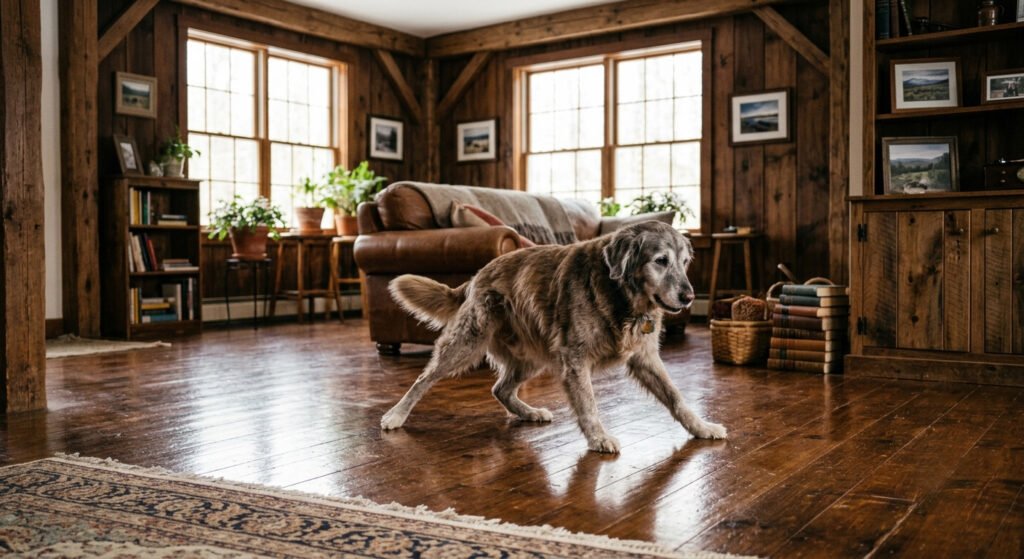
If your older dog has started scrambling on the hardwood, splaying their legs on the tile, or hesitating at the edge of a slick floor they used to cross without a thought, you’re not imagining it — and you’re not alone. Slipping is one of the most common struggles for aging dogs, and it’s one of the most fixable.
The good news: most of what looks like a dog “getting old and wobbly” is really a dog losing grip and confidence on hard floors. Fix the traction, and you often give a senior dog back a surprising amount of freedom — and spare them the falls that can cause real injury.
Here’s why senior dog slipping on floors happens, and exactly what helps.
Quick Fix Checklist
If your senior dog is slipping:
✔ Trim long nails
✔ Trim fur between paw pads
✔ Try toe grips
✔ Use paw wax if pads are dry
✔ Add runners where your dog walks most
✔ Visit your vet if slipping appears suddenly
Many owners notice a significant improvement after making just one or two of these changes.
Why Do Senior Dogs Slip on Floors?
A few things change as dogs age, and they tend to stack up:
- Nails do more work than you think. Dogs use their nails like cleats, digging in slightly for grip. On hardwood, tile, or laminate, hard nails can’t bite into the surface — they just slide. Overgrown nails make it worse by pushing the paw into an unnatural angle.
- Paw pads dry out and smooth over. Younger dogs have grippier pads. Older pads often become dry, cracked, or slick, losing traction.
- Muscle and confidence fade together. As hind-end muscle weakens, a dog’s footing gets less certain. After one or two scary slips, many dogs start to anticipate slipping — they tense up, move stiffly, and slip more. It becomes a cycle.
- Fur between the pads. Long tufts of fur growing over the paw pads act like little skis on smooth floors.
Sometimes slipping also points to something worth a vet’s eyes — arthritis, or nerve or spinal issues that affect the back legs. More on that at the end. But for the everyday slipping most senior dogs deal with, the fixes below make a real difference. If you’re noticing other changes besides slipping, read our guide on the 7 Signs Your Senior Dog Might Be in Pain to learn what else to watch for.
Comparison Table
| Solution | Cost | Difficulty | Best For |
|---|---|---|---|
| Toe Grips | Low | Easy | Everyday traction |
| Paw Wax | Low | Easy | Dry paws |
| Rugs | Medium | Easy | Main walking paths |
| Nail Trim | Free–Low | Easy | Overgrown nails |
| Flooring | High | Hard | Long-term solution |
What Actually Helps: Traction Solutions Ranked
1. Toe grips for the nails
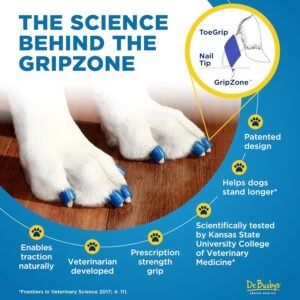
This is the fix most owners of slipping seniors reach for first, and for good reason. Toe grips are small rubber rings that fit over each nail and grip the floor where the nail can’t. Unlike socks or booties — which cover and effectively “disable” the paw — grips let your dog use their paws and nails naturally, just with traction restored.
They’re inexpensive, they don’t interfere with how your dog walks, and many owners notice steadier movement quickly. The one thing that matters: measure before you buy. Grips that are too loose fall off; too tight and they won’t go on. Follow the sizing guide, and check them periodically
Check Current Price on Amazon →
2. Paw wax for grip and pad care
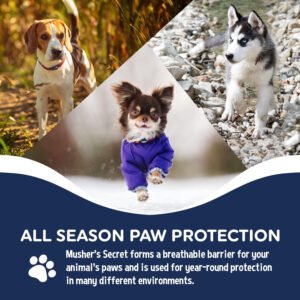
A food-grade paw wax does double duty: it conditions dry, cracked pads and adds a bit of traction. It’s a good companion to toe grips, especially if your dog’s pads have gone rough and smooth. Bonus — the same wax protects pads from hot pavement in summer and salt in winter.
Check Current Price on Amazon →
3. Rugs and runners along the routes your dog actually uses
Look at where your dog travels every day: the path from their bed to the water bowl, the route to the back door, the spot where they turn a corner. Those are the places to lay down non-slip rugs or runners. You don’t need to carpet the whole house — just create safe “lanes” on the journeys they make most. Rubber-backed runners work best so they don’t slide themselves.
4. Trim the nails and the paw fur
Two quick, free maintenance habits:
- Keep nails trimmed. Overgrown nails ruin a dog’s footing. If you can hear clicking on the floor, they’re likely too long.
- Trim the fur between the pads. A little tidy-up of the tufts growing over the pads removes those “skis” and lets the pads and grips make contact.
If you’re nervous about nails, your vet or groomer can do it — and it’s a good excuse for a quick mobility check.
5. Bigger changes: bath mats, yoga mats, and flooring
For trouble spots that stay slick — like in front of the couch a dog jumps down from, or a landing at the top of stairs — a rubber-backed bath mat or a cheap yoga mat gives instant grip. If you’re renovating anyway, textured or matte flooring is far kinder to old paws than high-gloss surfaces.
How Quickly Will These Fixes Help?
Many dogs walk more confidently within a few days after improving traction.
Simple changes like trimming nails, applying paw wax, or adding runners often produce immediate improvements. Building muscle strength or managing arthritis takes longer and should be discussed with your veterinarian.
Put It Together: A Simple Plan
You don’t need everything at once. A sensible order:
- Trim nails and paw fur (free, today).
- Add toe grips for everyday traction (the biggest single win for most dogs).
- Lay runners on your dog’s main routes.
- Add paw wax if the pads are dry or you want extra grip.
- Watch and adjust — see where your dog still hesitates, and treat those spots.
Change one thing at a time so you can see what’s actually helping.
Common Mistakes
Avoid these common errors:
- Waiting until your dog falls before making changes.
- Using slippery rugs without a non-slip backing.
- Letting nails grow too long.
- Assuming all slipping is “just old age.”
- Ignoring sudden weakness or dragging paws.
When Slipping Means “Call the Vet”
Traction fixes handle the everyday slipping that comes with age. But talk to your veterinarian if you notice any of these, because they can point to arthritis, pain, or a nerve or spinal issue that needs proper care:
- Sudden weakness, dragging a paw, or knuckling over (walking on the top of the foot)
- Slipping paired with obvious pain, reluctance to stand, or crying out
- A fast decline rather than a gradual one
- Loss of coordination in the back legs
Grips and rugs make a home safer, but they don’t treat an underlying condition. When something seems more than “just getting older,” get it checked — earlier is always better.
The Bottom Line
A senior dog who’s afraid of their own floors is a dog whose world is quietly shrinking — no confident trips to the water bowl, no easy greeting at the door. The fixes are cheap, simple, and genuinely effective: trim, grip, and lay down some traction where they walk. Most owners are surprised how much steadier — and how much happier — their dog is within a week or two.
Want the full rundown of what helps aging dogs stay comfortable and mobile? See our Senior Dog Essentials guide for beds, mobility aids, supplements, and more.
Simply Chea is reader-supported. Some links on this page are affiliate links, which means we may earn a commission if you buy through them — at no extra cost to you. This article is for general information only and is not veterinary advice; always consult your vet about your dog’s health.